
Someone asked me recently, “What’s a badge and how is it different from a logo”?
Here’s a quick answer that may be useful if you’re just getting into social media marketing. In a nutshell, a badge is a small image that you invite people to grab from your site or blog. It’s a tiny piece of sharable content. It should be cool looking and nicely designed. Perhaps it incorporates your logo.
But it does more. It explains — in a tiny space — the what and when of an event or how to join a cause or anything you want others to talk about for you.
 The badge at right is from the HHS / FDA / CDC social media page, launched to educate consumers and enable them to spread the word about the recent peanut butter recall due to salmonella infection. See more recall badges on a dedicated graphics page.
Best practice is to offer the badge in a variety of sizes so that a visitor can select one in a format that suits her and then easily upload to her blog or site.
Of course, key to the effectiveness of the badge as a promotional tactic is that you include a link so that anyone who clicks on your badge — no matter where it’s been posted — will go back to your site. (Click on the badge above.)
Seems like a no-brainer, doesn’t it?
Note: a badge is also useful to put up on a Facebook Group or Event page. And if you’re clever, you’ll design your badge so you can use it for a series of events by modifying it slightly to change the date or venue.
Here’s a great example of how to use a badge: Girl Scouts of the USA are now blogging about the dangers of cyberbullying, online predators and how to responsibly use social networks. And they’re offering a digital patch or badge (remember those patches they had to earn for stupid projects?) to scouts who want to spread the word.
Badges vs. Widgets
Badges vs. widgets (see below)? That’s a discussion for another day. Suffice it to say that badges are simpler to create and don’t require any complex coding.
How to use the embed code
Below is an old example of a badge from TECH Cocktail, a popular tech networking event.
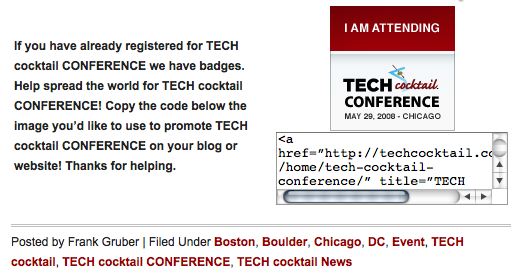
You’ll note that there’s a bit of code underneath the badge. Don’t be afraid to use it when you see it on a badge download page. Copy all of it and paste it into the HTML or “code” view of your blog. Hit save and publish. Presto, you should see the badge on your blog. And it will be clickable, linking you back to the original site.